
EE Coverage Checker: How to Check EE Signal in Your Area
Reliable coverage is essential for UK businesses. Whether switching to EE or evaluating your current signal, an EE coverage checker helps you make informed connectivity decisions. This guide covers everything about checking EE signal strength in your area.
Why Check EE Coverage Before Committing?
Before committing to a contract, verify that the EE network covers your key business locations. Poor signal leads to dropped calls, failed connections, and frustrated employees – directly impacting productivity.
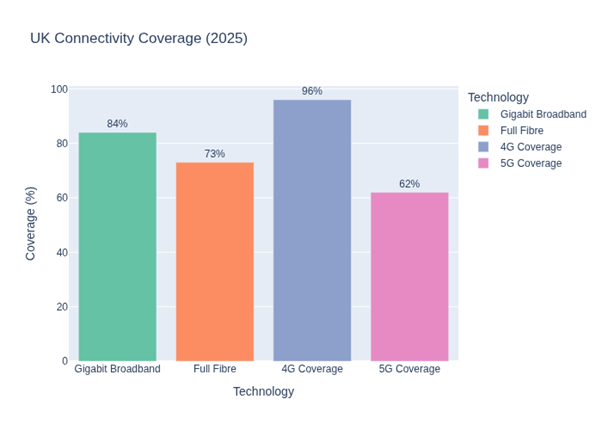
EE runs the UK's largest network, covering 99% of the population for 4G. But coverage varies by location, building type, and geography. Taking time to check EE coverage in my area avoids surprises after signing a contract.
How to Use the Official EE Coverage Checker
The most reliable way to verify EE mobile coverage is through EE's official coverage checking tools. Here's a step-by-step guide to using the EE signal checker:
Step 1: Access the EE Coverage Map
Visit the EE website and navigate to their coverage checker tool. You can search by postcode, town, or city name. The tool provides detailed information about signal availability for your specific location.
Step 2: Enter Your Business Location
Input the postcode of your primary business address or any location where you need reliable coverage. For businesses with multiple sites, repeat this process for each location to ensure comprehensive coverage across your operations.
Step 3: Review Coverage Details
The EE coverage map will display colour-coded information showing signal strength. Look for the following indicators:
- Dark green: Excellent outdoor and indoor coverage
- Light green: Good outdoor coverage, variable indoor coverage
- Yellow: Outdoor coverage only, limited indoor signal
- White/no colour: No coverage available
Step 4: Check Specific Technologies
Toggle between 2G, 4G and 5G maps to see what's available in your area. For modern business needs, focus on 4G and EE 5G coverage.
Understanding EE 4G vs 5G Coverage
When performing an EE network coverage check, it's important to understand the differences between 4G and 5G availability and what each technology offers your business.
| Feature | 4G Coverage | 5G Coverage |
|---|---|---|
| UK Availability | 99% of UK population | Available in 160+ towns and cities |
| Typical Speeds | 20-60 Mbps | 100-300+ Mbps |
| Best For | Standard business use, calls, email, browsing | Data-intensive applications, video conferencing, large file transfers |
| Indoor Penetration | Good in most buildings | Can be reduced in dense structures |
For most business applications, robust 4G coverage remains perfectly adequate. However, if your business relies on high-bandwidth applications, cloud services, or real-time data transfer, checking for EE 5G coverage availability could provide significant benefits.
Using the Ofcom Mobile Coverage Checker
In addition to EE's official tools, Ofcom provides an independent coverage checker that allows you to compare EE coverage with other UK networks. This impartial tool is particularly valuable for businesses evaluating multiple providers.
How to Use Ofcom's Checker
Enter your postcode on the Ofcom mobile coverage checker. It shows predicted coverage for voice, data, and all technologies across every UK operator — letting you compare EE directly against O2, Vodafone, and Three at your location.
The Ofcom checker also provides data on:
- Predicted mobile availability indoors and outdoors
- Coverage along major roads and rail routes
- Download and upload speed predictions
- Geographic coverage maps
Indoor vs Outdoor Coverage: What You Need to Know
One of the most important distinctions when checking EE signal strength is the difference between indoor and outdoor coverage. Many businesses experience frustration when they discover that good outdoor coverage doesn't translate to reliable indoor signal.
Factors Affecting Indoor Coverage
Several elements influence how well mobile signal penetrates buildings:
- Building materials: Concrete, metal, and energy-efficient glass can significantly reduce signal strength
- Building age and construction: Modern buildings with thick insulation often have poorer signal penetration
- Distance from mast: Buildings further from mobile masts receive weaker signals that struggle to penetrate indoors
- Floor level: Basement and ground floor offices typically experience weaker signals than upper floors
- Surrounding structures: Dense urban environments with tall buildings can create signal shadows
Testing Indoor Coverage
When using an EE coverage checker, always verify signal strength inside your actual workspace, not just the outdoor prediction. If possible, request a trial device or SIM card to test real-world performance before committing to a business contract.
Real-World Coverage Testing Tips
While online coverage checkers provide valuable predictions, real-world testing offers the most accurate assessment of EE network coverage. Here are expert tips for conducting your own coverage tests:
Test at Different Times
Mobile network performance can vary throughout the day due to network congestion. Test signal strength during peak business hours (typically 9am-5pm) to assess performance when you'll actually need it.
Test in Multiple Locations
Don't just test at your desk. Walk around your entire premises, including:
- Meeting rooms and conference facilities
- Break areas where employees might take calls
- Warehouse or storage areas
- Car parks and outdoor spaces
- Lifts and stairwells
Use Speed Testing Apps
Download apps like Speedtest or Ookla to measure actual data speeds. For business use, look for consistent speeds of at least 10 Mbps for downloads to support multiple applications simultaneously.
Test Voice Call Quality
Make several test calls to check voice clarity, connection time, and call stability. Enable 4G calling (VoLTE) if available, as this typically provides superior voice quality compared to traditional 2G/3G calls.
What to Do If EE Coverage Is Poor
If your EE coverage checker results show poor signal, or real-world testing reveals connectivity issues, several solutions can improve your mobile experience:
Wi-Fi Calling
EE supports Wi-Fi calling on compatible devices. This feature routes calls and texts through your office Wi-Fi network when mobile signal is weak. For businesses with reliable broadband, Wi-Fi calling effectively eliminates indoor coverage issues.
Signal Boosters
Signal boosters (repeaters) amplify weak external signals indoors using an external antenna to capture signal and an internal one to distribute it. Always use Ofcom-approved devices to stay legal.
Femtocells
EE offers femtocell solutions for businesses experiencing persistent coverage problems. These small devices connect to your broadband and create a localised mobile signal bubble, providing excellent coverage within a limited area.
Consider Alternative Solutions
If coverage remains problematic, consider:
- Dual-SIM devices: Use devices that support two networks simultaneously, providing backup connectivity
- Multi-network solutions: Some business providers offer services that automatically switch between multiple networks
- Alternative providers: Compare coverage with other UK networks using Ofcom's checker
EE Coverage for Business Vehicles and Remote Workers
Modern businesses increasingly require coverage beyond fixed office locations. When checking EE mobile coverage, consider these scenarios:
Coverage on Major Routes
For businesses with field-based staff or delivery operations, check EE's coverage along major motorways and A-roads. The Ofcom checker provides specific data on mobile availability along transport routes.
Rural and Remote Coverage
EE's network excels in urban areas but coverage in remote rural locations can be limited. The government's Shared Rural Network initiative is improving this, but always verify coverage in specific rural locations where your business operates.
Cross-Border Coverage
For businesses operating near the Scottish, Welsh, or Northern Irish borders, check coverage on both sides of regional boundaries. Border areas sometimes experience weaker signals due to mast positioning.
Understanding Coverage Predictions vs Reality
It's important to recognise that coverage checkers provide predictions based on modelling, not guarantees. The actual EE signal you experience may vary from predictions due to:
- Local topography and obstacles not captured in models
- Temporary network issues or maintenance
- Network congestion during peak times
- Device-specific factors (antenna quality, age, damage)
- Weather conditions (heavy rain can affect signal, particularly 5G)
Coverage predictions typically show expected performance under ideal conditions. Real-world performance, particularly indoors, may be one or two categories lower than outdoor predictions.
Questions to Ask When Evaluating EE Coverage
Before committing to EE for your business mobiles, use the EE coverage checker to answer these key questions:
- Is 4G coverage available at all my business locations?
- Does the prediction show indoor coverage, or outdoor only?
- Is 5G available if my business needs higher data speeds?
- How does EE's coverage compare to other networks in my area?
- Are there any obvious coverage gaps between key locations?
- What coverage is available along routes my staff regularly travel?
How Connection Technologies Can Help
Choosing the right mobile network for your business involves more than just checking coverage maps. As a specialist UK business mobile and IT services provider, Connection Technologies offers expert guidance on selecting the optimal connectivity solution for your specific requirements.
Our team can help you:
- Conduct comprehensive coverage assessments across all your business locations
- Compare EE network performance against alternative providers
- Design multi-network solutions for businesses with challenging coverage requirements
- Implement signal improvement solutions including Wi-Fi calling and femtocells
- Source the right devices and tariffs to match your coverage needs and budget
Staying Updated on EE Network Improvements
The EE network continuously expands and improves. Regular upgrades mean that coverage predictions can change over time. If current coverage is marginal but not quite adequate, checking back periodically may reveal improvements.
EE regularly announces network expansion, particularly for 5G services. Subscribing to EE's business updates or working with a partner like Connection Technologies ensures you stay informed about coverage enhancements that could benefit your business.
Making an Informed Decision
An EE coverage checker is an essential first step in choosing the right network. Combine online predictions with real-world testing and your specific requirements to make a confident decision.
Remember that excellent coverage is just one factor in choosing a business mobile provider. Consider also:
- Contract terms and flexibility
- Business support and account management
- Device options and upgrade policies
- Additional business services and integrations
- Total cost of ownership
Need help evaluating EE coverage? Contact Connection Technologies for personalised recommendations based on your locations, usage patterns, and business objectives.
Further Reading
Read More on Our Blog
Find the Best Network for Your Business
Compare business mobile deals from EE, O2, Three and Vodafone. Free quotes in 60 seconds.
Get Free Quotes →